
What We Learned from Our Beta
Usage patterns from our beta. How the platform grew, how people used it, what challenged us, and what it all means for what we build next.
April 17, 2026 · 11 min read

The Nodejam beta went live in November 2025. 5 months later, the patterns speak for themselves. This post breaks down the growth, the usage data, what surprised us, and what it all means for what we build next.
4
Design partners
767
Users
3,245
Files created
1,818
Sessions
9,682
Messages
The growth curve
November started slow, as expected. 93 signups, a few hundred files, people exploring. By December the pace picked up. By February the weekly file creation rate had nearly doubled compared to launch month. March was the strongest month across every metric. 210 new users, 892 files created, 493 sessions.
Platform Growth
The ratio between signups and activity stayed consistent. March signups were 2.3x November. March file creation was 1.8x November. March sessions were 1.9x November. Usage grew alongside the user base rather than flattening out.
The next question is where those signups came from. For the first 4 months, nearly all growth came through direct outreach and referrals. LinkedIn brought in a handful of signups from occasional posts, but nothing deliberate. In March, we started broadcasting on both LinkedIn and Reddit. That's where the spike came from.
Signup Channels
Through February, direct outreach and referrals accounted for over 90% of monthly signups. The March shift stands out. Reddit appeared as a channel for the first time and immediately became the largest single source with 96 signups. LinkedIn jumped from single digits to 58. Combined, the 2 platforms brought in 154 of the month's 210 signups. Direct referrals dropped from 134 to 56, not because outreach slowed, but because people who would have come through a warm intro found us through the posts instead. April's partial numbers suggest the channel mix is settling into a broader distribution rather than reverting to the earlier pattern.
People used every file type
One of the earliest bets we made was unifying text documents, spreadsheets, and slides into a single workspace. The question was whether people would actually use all of them, or just default to one type and ignore the rest.
File Type Distribution
3,245 files across the beta
Of the 3,245 files created during the beta, 42% were text documents, 38% were spreadsheets, and 19% were slides. That split is closer to even than we expected. Text leads because that's where most work starts. Drafting ideas, structuring arguments, getting things out of your head and into a document. Spreadsheets are close behind because they're where the number crunching and data organization happens. Slides trail because presentations are typically the final deliverable. You build the deck after the content and analysis are done. The distribution reflects a natural workflow progression from thinking to analysis to delivery, not a gap in any one editor.
People created spreadsheets in the same workspace where they drafted reports and built presentations alongside the data they pulled from. Every file type saw consistent activity across the beta.
Import and export quality
Of the 3,245 files in the beta, 908 came from imports and 1,296 were exported. We track 2 things on every conversion. Did the original data survive intact (data integrity), and did the formatting come through correctly (formatting fidelity). Import is inherently harder than export. The pipeline has to parse whatever structure and styling the source file carries. Export starts from a clean, known internal format and generates the output from scratch.
Import Fidelity by Format
98.2% data integrity, 94.7% formatting fidelity across all imports
CSV imports at 100% across both metrics because there's no formatting to lose. From there, fidelity drops as format complexity increases. XLSX and DOCX hold above 94% on both measures, with most drift coming from conditional formatting, nested styles, and embedded images. PDF is harder because the format is designed for rendering, not editing. PPTX trails at 89.7% formatting fidelity because slide positioning, theme inheritance, and master slide layering are the most complex conversion challenges.
Export tells a different story. 1,296 files were exported during the beta. Because exports start from our own internal representation rather than parsing an unknown external file, the pipeline controls the entire output. That shows in the numbers.
Export Fidelity by Format
99.6% data integrity, 97.3% formatting fidelity across all exports
Export fidelity runs 1 to 3 percentage points higher than import across every format. The pipeline controls the entire output, so there's less room for drift. PPTX is still the tightest margin at 94.2% formatting fidelity, with slide coordinate mapping and theme color translation accounting for most of the gap.
Agent reliability in practice
The agent processed 9,682 messages across the beta period.
Agent Execution Reliability
9,682
messages
First-attempt success
Agent understood the task, executed the right tools, and delivered the result with no retries or intervention.
Auto-recovered
Hit a transient issue (upstream rate limit, network timeout) and recovered automatically via built-in retry. User never saw an error.
User clarification
Agent recognized genuine ambiguity and asked the user to specify before proceeding.
Failed
Agent couldn't complete the task. Most traced to edge cases in spreadsheet and slides tooling, since patched or on the immediate roadmap.
91.2% of interactions completed successfully on the first attempt. Another 5.8% hit transient infrastructure issues and recovered automatically through the built-in retry system. The user never saw an error. From their perspective, the response was just a bit slower. That's 97% effective success from the user's side.
2.1% triggered the clarification system, where the agent recognized ambiguity and asked the user to specify before proceeding. 0.9% genuinely failed. That's 87 interactions out of 9,682. Every failure is logged, and most trace back to edge cases in the spreadsheet and slides tooling that we've since patched or have on the immediate roadmap.
What we shipped
Between November 2025 and April 2026, we shipped 60 platform updates. That works out to roughly 3 per week across the editors, agent, import and export, and interface and performance.
Updates by Platform Area
60 updates across 4 areas in 5 months
November and December were foundation months. The core agent shipped, text editing stabilized, and the first spreadsheet and slides capabilities went live. January was the densest month by far. All 3 editors received major features at the same time. Multi-sheet spreadsheets, free-form slides editing, document pagination, XLSX import and export, and deck templates. February and March shifted toward refinement, covering agent reliability, inline editing, deep research, and security. April narrowed to import quality across all file formats.
That pace, roughly 3 updates per week touching every layer of the platform, ran alongside the reliability numbers from the previous section. The agent held 91.2% first-attempt success and sub-1% hard failure throughout.
Who comes back
Of the 685 users who started at least 1 session, 66% came back for a second. Here's how that breaks down.
Session Engagement Depth
66% of users returned for 2+ sessions
The single-session group (34%) is mostly task-completion behavior. Someone signs up, creates a document, exports it, and moves on.
The 4+ session group (29%) builds workspaces over time, creates multiple files, and comes back across days and weeks. This pattern overlaps with our enterprise design partners and matches how teams manage ongoing operational work.
The contrast with our enterprise design partners is sharper. Every single user returned for multiple sessions.
Design Partner Engagement
100% of design partner users returned for multiple sessions
Design partner users averaged 7.6 sessions each, compared to 2.7 across the broader beta. The gap isn't surprising. Design partners had specific operational workflows they were solving for, and the product fit those workflows. The property development team ran fewer sessions but produced more files per session because their work involved dense multi-file synthesis across spreadsheets, text, and slides. The hospitality and finance teams ran more frequent sessions over their evaluation windows.
Office documents tend to have a clear finish line. A cover letter gets written, exported, and submitted. A budget spreadsheet gets built and sent to a manager. Once the deliverable is done, there's no immediate reason to come back. That's what the 34% single-session group reflects. It's not dissatisfaction. It's how document work happens. Design partners show the other side. A hospitality company reconciling weekly inventory across spreadsheets, text, and slides always has the next task queued up. Their 7.6 sessions per user compared to 2.7 in the broader beta isn't about product quality. It's about workflow frequency. The broader beta and the design partner cohort are measuring the same product against 2 different work patterns.
User behavior
We tracked interaction patterns across the interface to understand where users spend their attention.
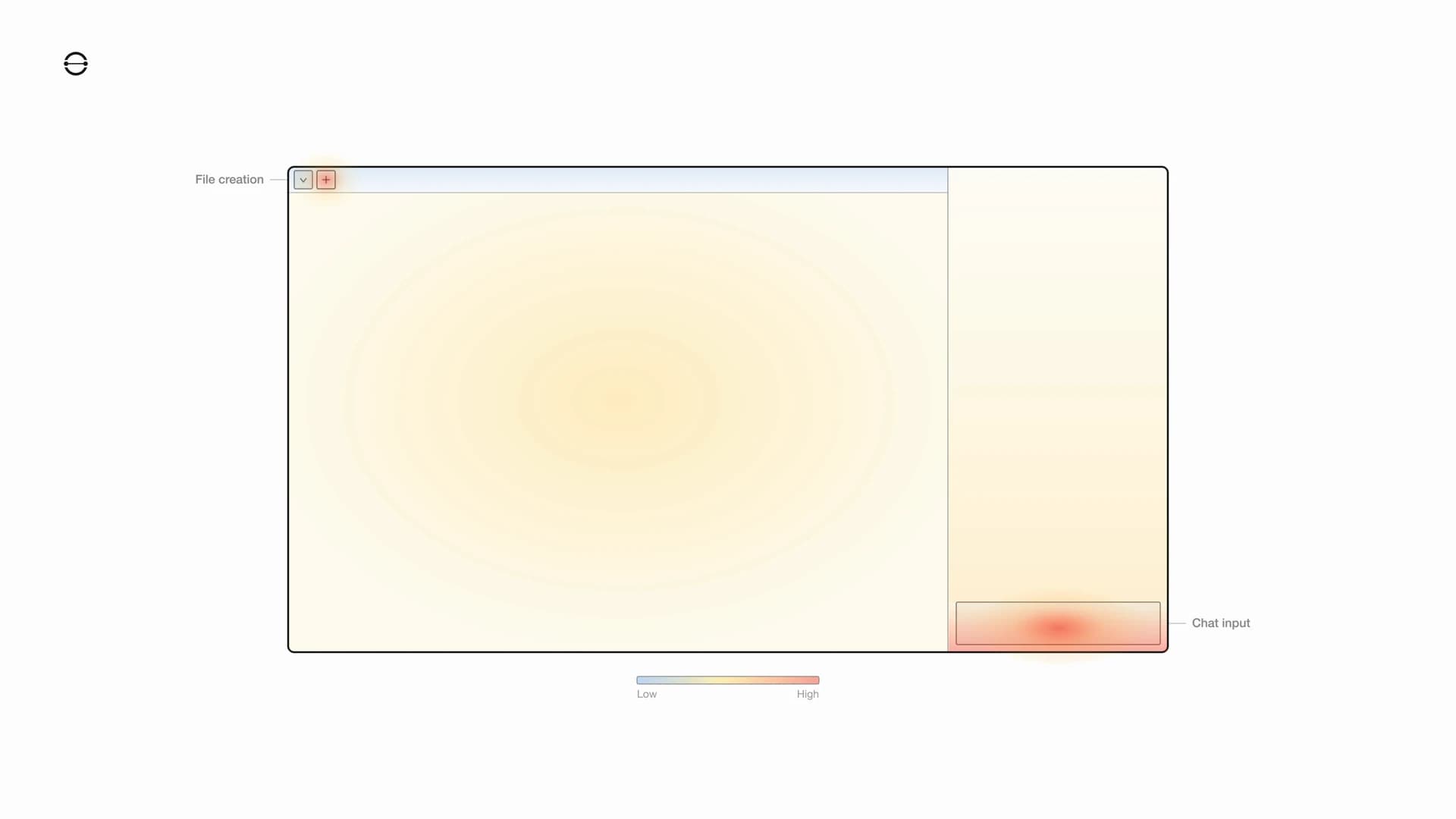
The chat input is the hottest zone. Most users go there first. The platform is an office suite, but the entry point is conversational. Users describe what they need, and the agent builds it. Design partners tended to start differently. They often arrived with existing files to import, so the file creation button saw more early use from that group. Not all of them, but the tendency was consistent. The editor content area and chat message panel show moderate, sustained activity. People read agent responses and review their documents, but the interaction starts and concentrates at the input.
Adoption challenges
Compliance adds days, sometimes weeks. Design partners often needed NDAs before they'd upload files. Their IT departments needed time to evaluate the platform and approve access. We don't currently hold compliance certifications, which makes that evaluation longer than it would be otherwise. Enterprise adoption moves at the speed of trust, and trust takes time to build.
Storage capacity is a real constraint. We're currently a small team, and that puts a ceiling on how many files users can import and keep on the platform. It shapes what we can offer and how aggressively we can grow the user base.
What surprised us
3 things we didn't predict going in.
Spreadsheet usage was much higher than expected. Internal projections had text documents at 55% or more of total files. The actual number was 42%, with spreadsheets at 38%. People are doing more structured data work than we assumed. Some of this is import-driven (users bringing in existing Excel files), but a meaningful portion is net-new spreadsheets created through the agent. That changes our prioritization. Spreadsheet tooling gets more investment than we originally planned.
Sessions are outcome-driven. The average session was 5.3 messages. The median was 4. Most sessions follow the same pattern. Open a file, work through the task in a few exchanges, export or finalize, done. 1,296 files were exported during the beta from 1,818 total sessions. When the deliverable is ready, the session ends.
We expected more breakage. We ship weekly and the platform covers document creation, file conversion, and an agent layer. We were braced for outages and data issues. Neither showed up in any serious way. The failures we did see traced back to specific tooling gaps in spreadsheets and slides, not platform-level problems.
What comes next
The beta showed us where the product works and where it doesn't yet. Import and export fidelity is the most consistent source of friction. Users bring in complex Word documents or dense Excel files and expect pixel-level accuracy. We're close on most formats, but edge cases in table layouts, nested styles, and embedded images still need work. The conversion pipeline has improved significantly since launch, and it's the area where engineering hours have the most direct impact on user satisfaction.
Enterprise-grade charts
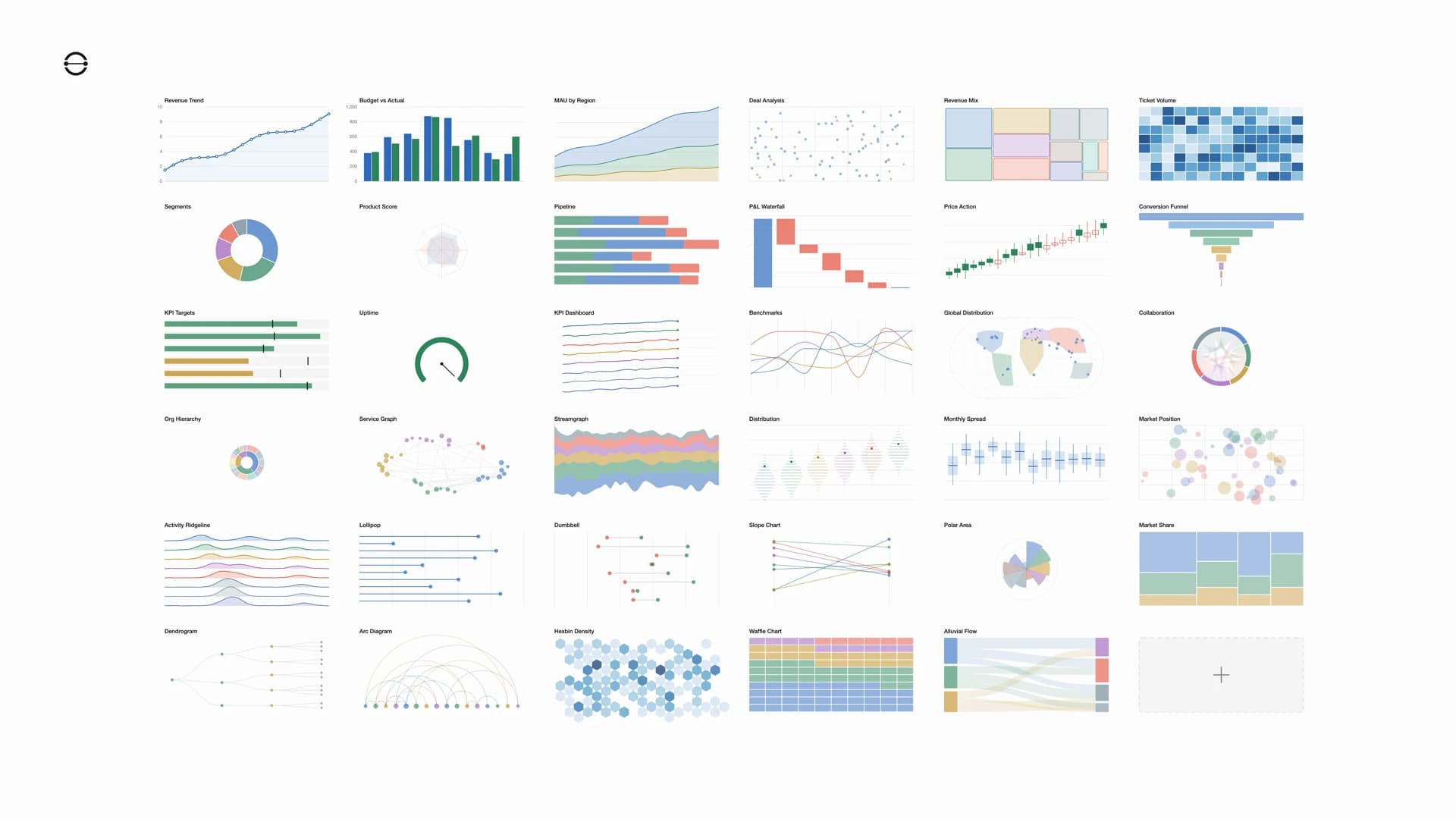
Documents, spreadsheets, and presentations without data visualization are incomplete. We're building a dense charting layer directly into all 3 editors, from standard bar and line charts to treemaps, heatmaps, geo projections, chord diagrams, and everything in between.
Semantic agent processing for import and export
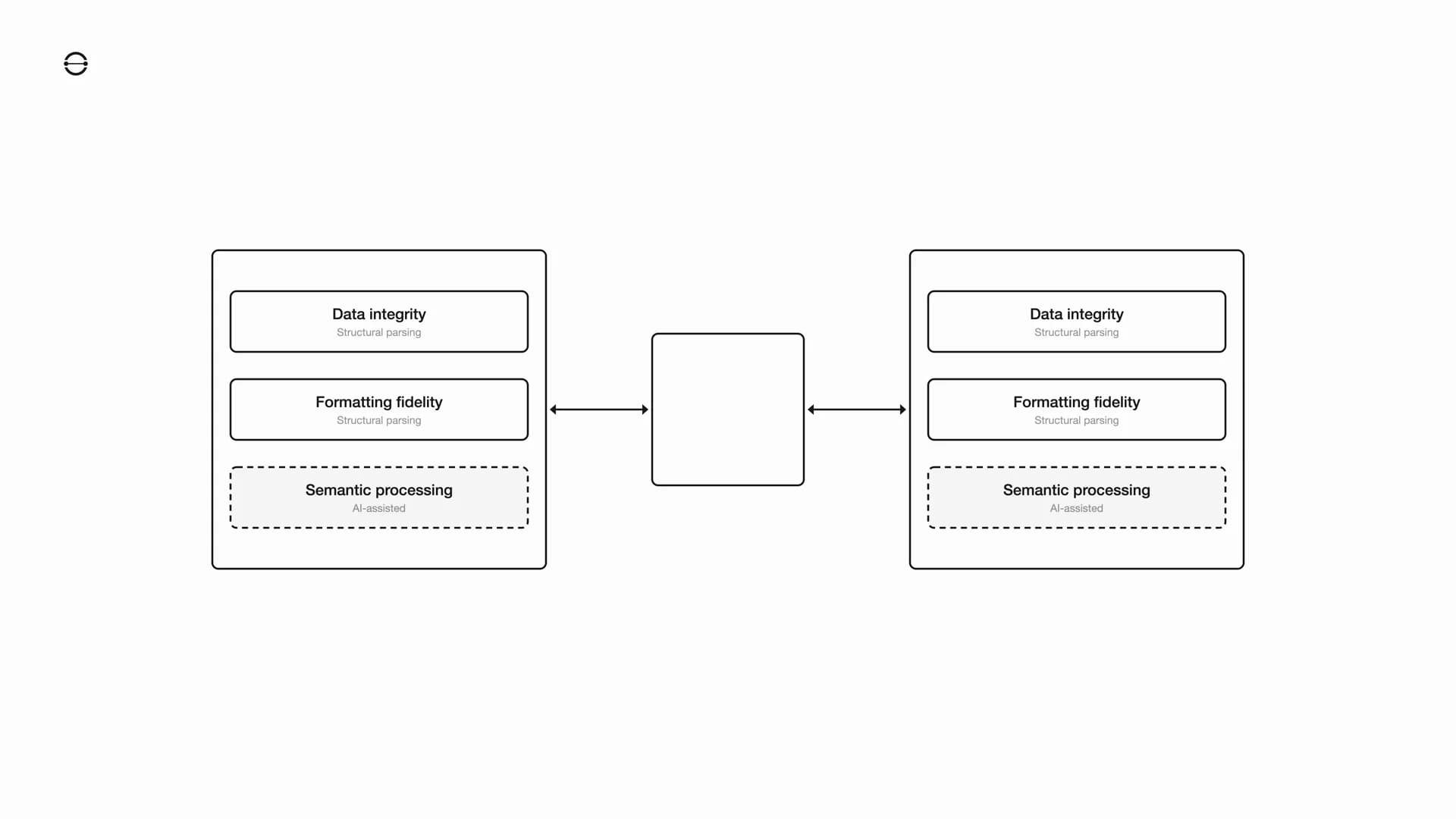
The conversion pipeline right now is purely structural. It maps elements one to one, a heading stays a heading, a cell stays a cell. That works for most of the file, but it has a ceiling. A table that loses its column proportions or a gradient that shifts colors aren't structural problems. They're semantic ones. We're adding an agent layer that understands what the document is supposed to look like and fixes what structural parsing can't.
File format encryption and security
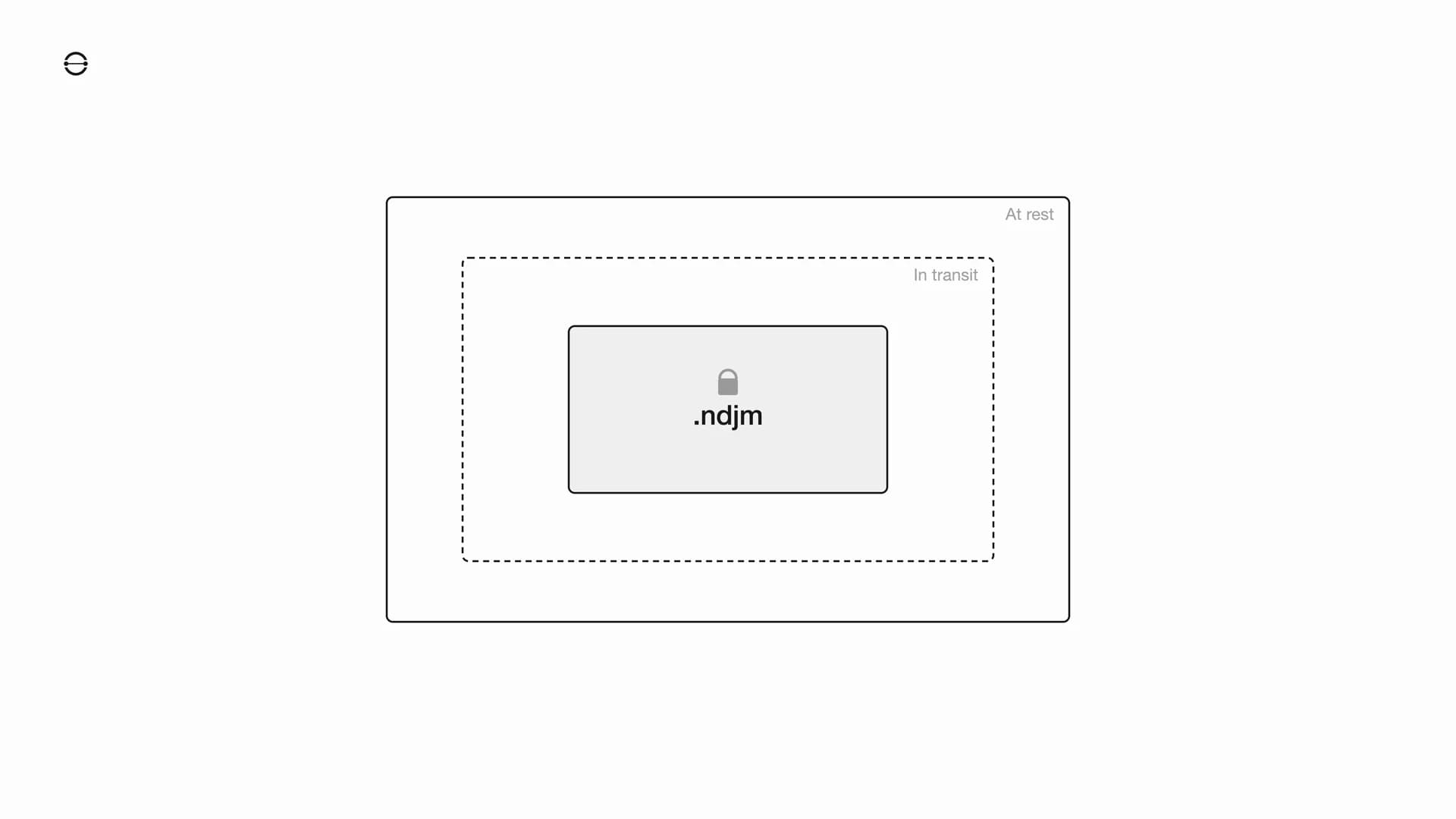
Data is already encrypted in transit and at rest. The next step is encrypting the format itself so the file is protected regardless of where it lives or how it moves.
Multi-project dashboard
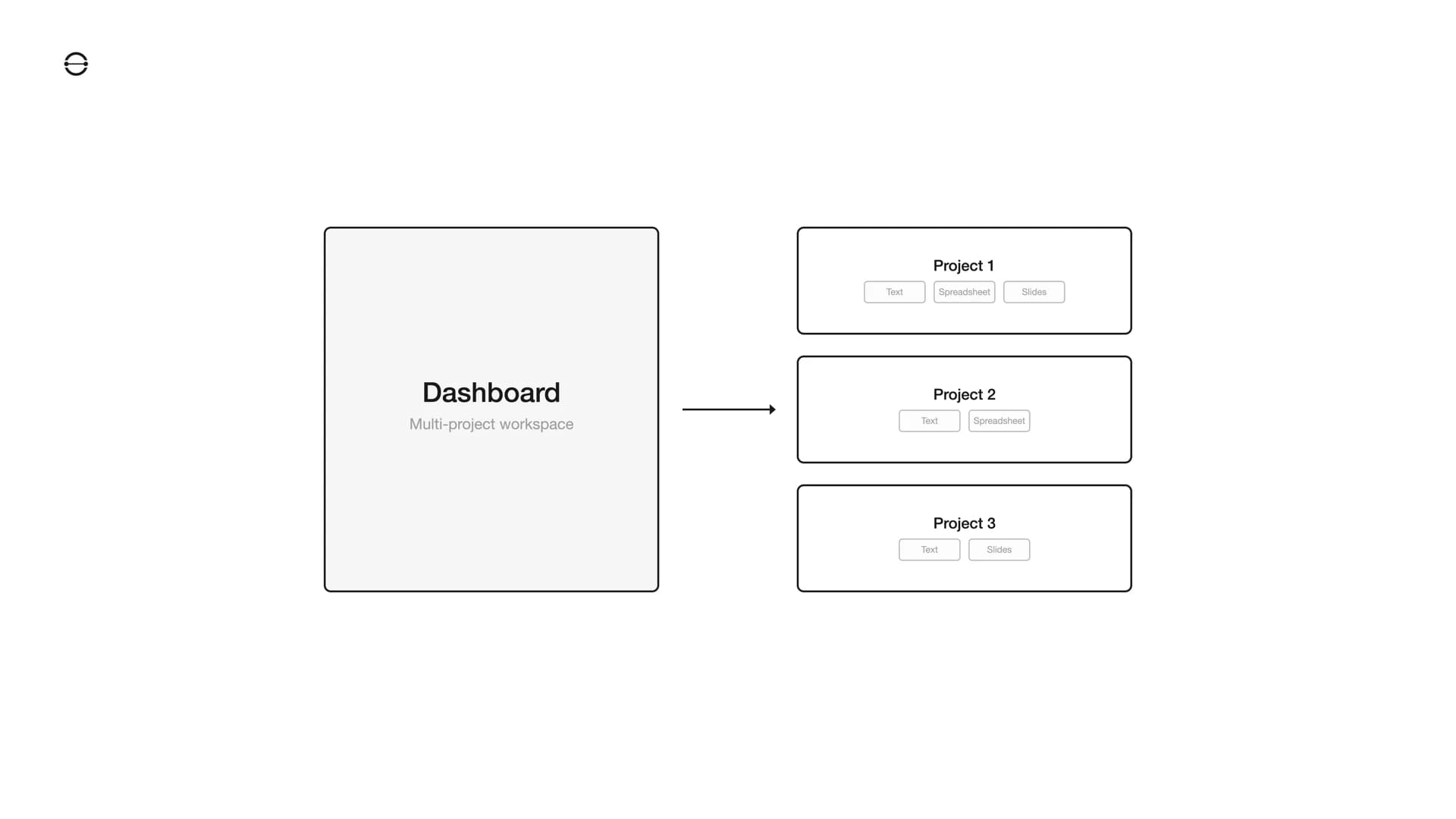
The beta runs on a single-project model. One user, one project, straight into the editor. That works for testing, but enterprise teams need to manage multiple projects across people and departments. The next step is a dashboard layer where users create, organize, and switch between projects without losing the direct editing experience.
And everything else, better...
You get the idea.