
From branch KPIs to partner review in one workspace
Cheng & Co is a mid-sized Malaysian accounting firm and TGS Global member. Their audit and advisory team used Nodejam to move branch reporting, client proposals, and tax-response work through a single workspace, producing 12 files and 18 AI sessions over two weeks.
January 2026 · 6 min read

The challenge
Cheng & Co Group is a mid-sized Malaysian accounting firm and member of the TGS Global network, with over 400 staff across multiple branches. At the branch level, a team of roughly 18 professionals manages three service lines: audit, tax, and advisory. The branch leadership oversees everything from staff utilization and KPI tracking to client engagement fees and quarterly reporting for the Managing Partner.
The work was spread across a familiar set of disconnected tools. Branch KPI exports arrived as spreadsheet attachments. Staffing utilization data lived in a separate capacity tracker. Client proposals were drafted in Word, engagement fees modeled in Excel, and partner review presentations built in PowerPoint. When an LHDN audit notice landed, the response involved a client letter in one application, a document checklist in another, and a web search in a third. Every quarterly review meant pulling data from multiple sources into separate files, then rebuilding the narrative in a slide deck for the Managing Partner.
Scattered tools
- Branch KPI exports forwarded as email attachments
- Staffing utilization tracked in a separate capacity spreadsheet
- Client proposals in Word, fee models in Excel, partner decks in PowerPoint
- LHDN audit responses assembled across email, research tools, and document editors
- Quarterly operating reviews rebuilt from scratch each cycle
One workspace
- KPI exports and audit notices brought directly into the project
- Branch reports, utilization trackers, and fee models live side by side
- Client proposals and their pricing workbooks stay linked in one project
- Audit-response letters and prep checklists generated from attached notices
- Monthly operating reviews synthesized from existing project files
Use case highlights
From Branch Export to Partner Review
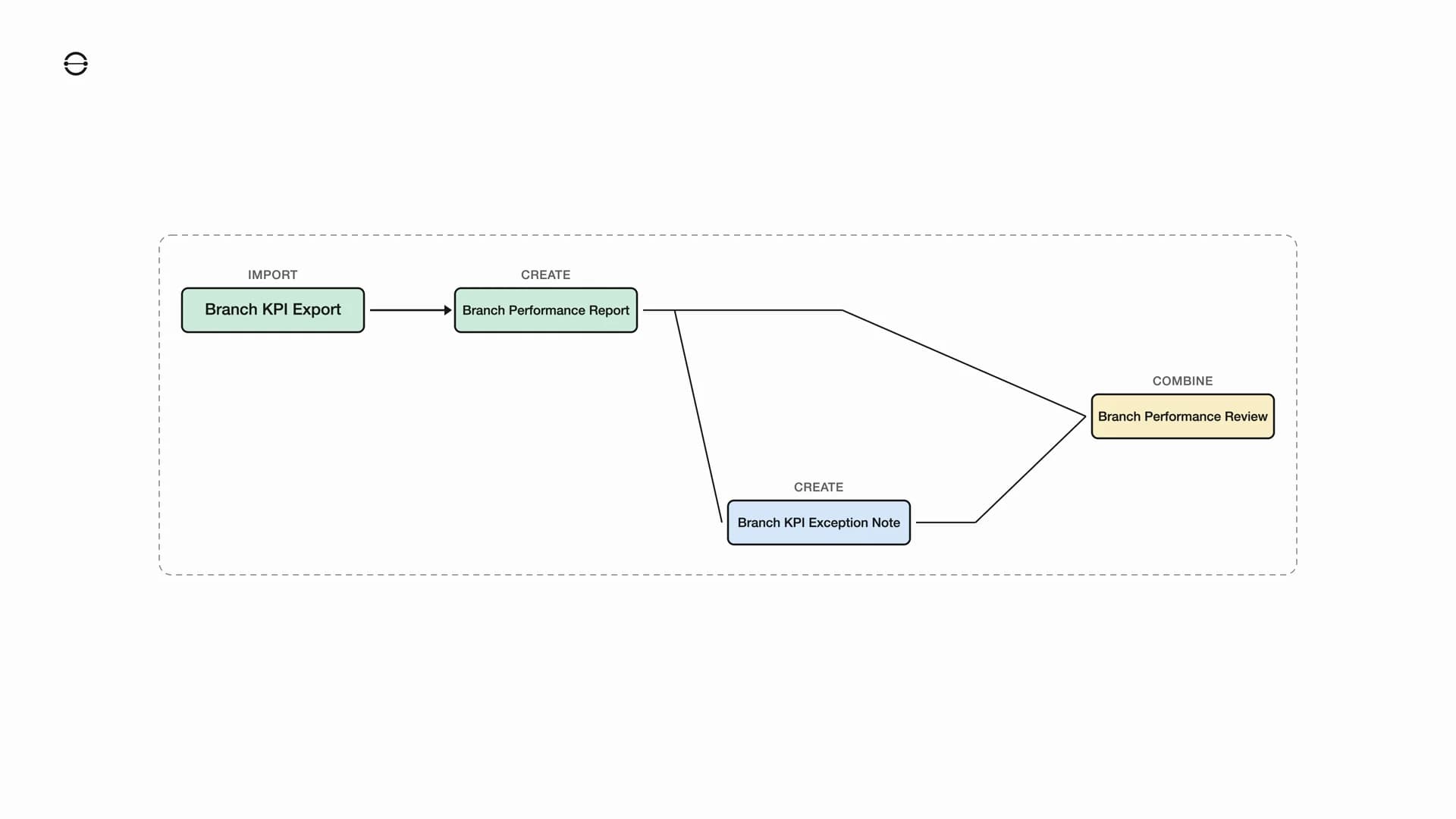
The operations analyst begins by importing a branch KPI export into the workspace. From that data, Nodejam creates a Branch Performance Report, a four-sheet workbook organized by service line across audit, tax, and advisory. In the same session, it produces a Branch KPI Exception Note that flags the items needing leadership attention. Those two outputs, the working spreadsheet report and the written exception note, then feed into a single step where Nodejam combines them into a Branch Performance Review, a seven-page slide deck ready for the partner meeting.
With separate tools, the KPI export would land in a spreadsheet application, the exception note would be drafted in a word processor, and the partner review would be built from scratch in a presentation tool. Each handoff would mean copying figures, reformatting tables, and losing the connection between a flagged exception and the data behind it. Here the entire chain stays in one workspace, so the slide deck at the end is still directly tied to the imported branch export it started from.
From Branch Diagnosis to a 30-Day Action Plan
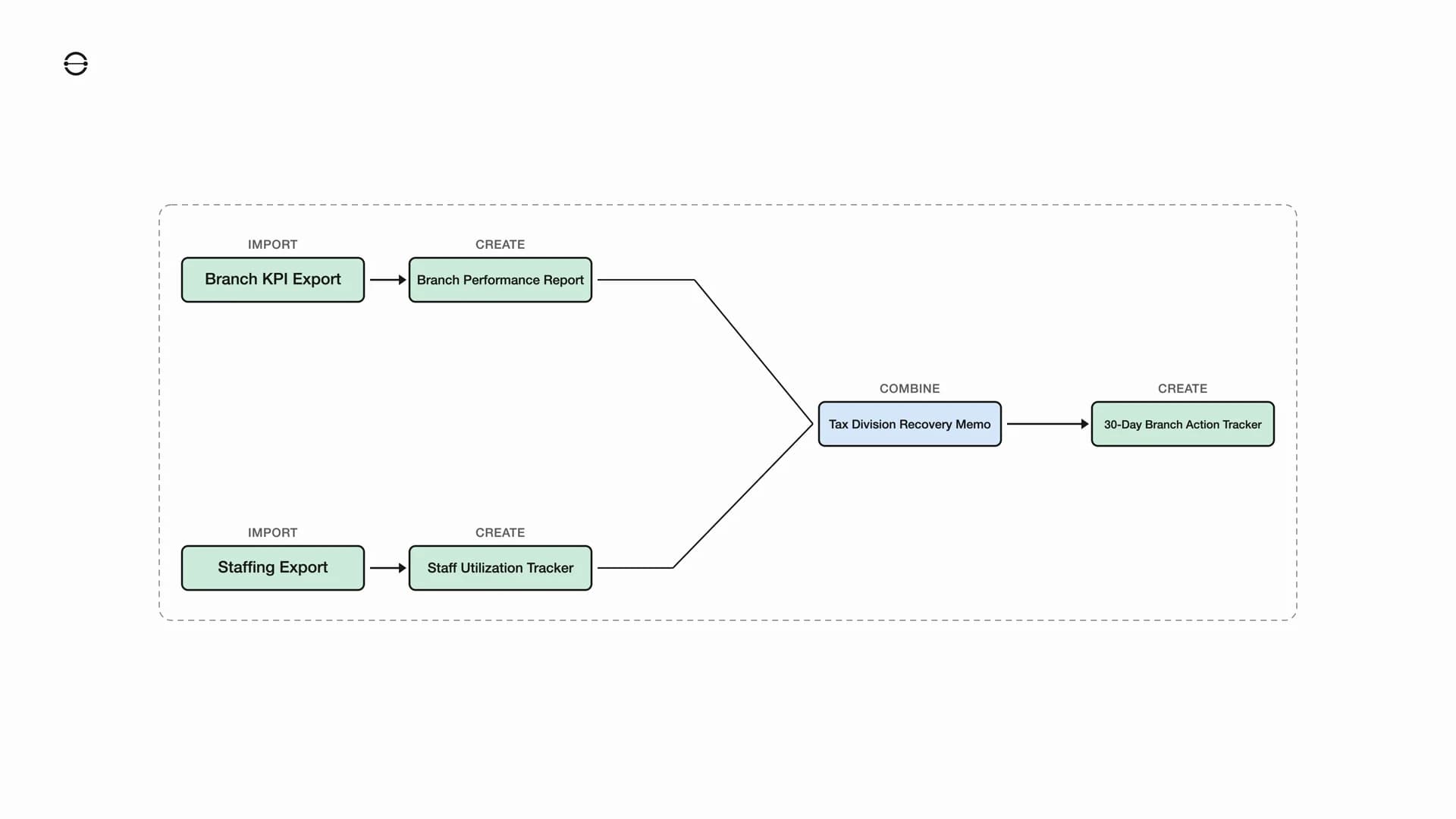
This workflow runs on two parallel tracks that converge into a single management output. On the first track, the operations analyst imports a branch KPI export and creates the Branch Performance Report. On the second track, the same analyst imports a staffing and chargeable-hours export and creates a Staff Utilization Tracker, a two-sheet workbook covering individual staff detail and a service-line summary. The audit partner lead then combines both workbooks to write a Tax Division Recovery Memo. Before writing that memo, Nodejam pauses to ask whether the audience is the Managing Partner or the branch heads, and proceeds once the answer is clear. From the completed memo, it creates a 30-Day Branch Action Tracker that turns the recovery narrative into a structured spreadsheet with specific follow-through items.
In a traditional setup, the KPI data and staffing data would each live in their own spreadsheet application, the recovery memo would be drafted in a word processor, and the action tracker would be built in yet another spreadsheet with no link back to the memo that justified it. Updating a utilization figure would mean re-opening the memo and the tracker separately to propagate the change. Here the diagnostic spreadsheets, the memo written for the right audience, and the follow-through tracker all live in one workspace, so the action plan stays grounded in the branch and staffing data that surfaced the problem.
From Monthly Branch Work to One Operating Review
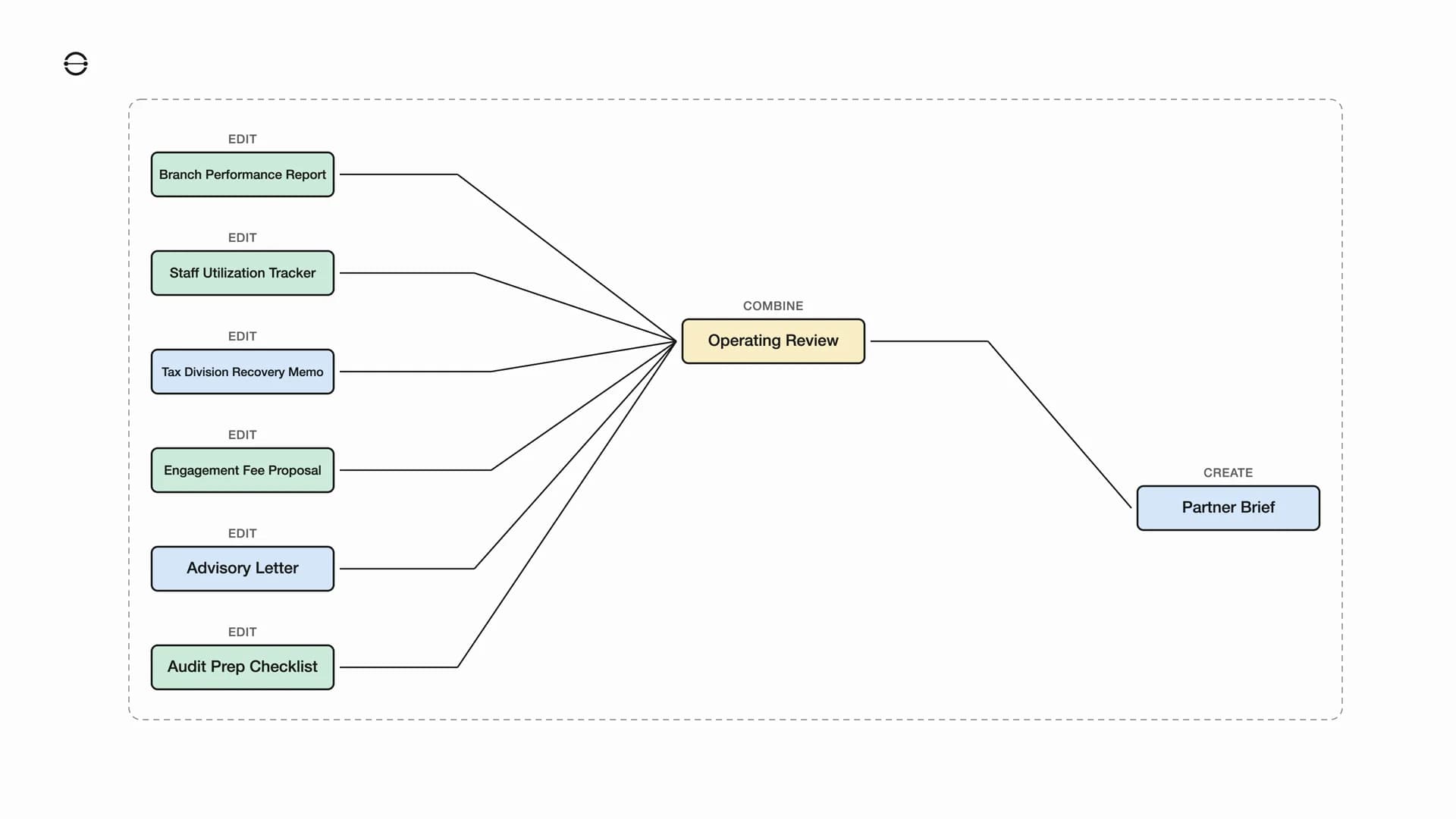
The audit partner lead closes the month by pulling together six working files that span three file types. On the spreadsheet side, that means the Branch Performance Report, the Staff Utilization Tracker, the Engagement Fee Proposal, and the Audit Prep Checklist. On the text side, that means the Tax Division Recovery Memo and the Advisory Letter. Nodejam reads across all six and combines them into a single Operating Review, a six-page slide deck that covers branch performance, staffing, tax recovery, client pricing, and audit-response status in one narrative. From that review deck, it then creates a Partner Brief, a concise text document designed as a standalone summary for the Managing Partner.
This is the step where separate tools break down most visibly. The six source files would be scattered across spreadsheet and word-processing applications, the operating review would be assembled manually in a presentation tool, and the partner brief would be retyped in a document editor with no live connection to the deck or the files behind it. Every quarterly cycle would mean repeating that assembly from scratch. Here all six files, the review deck, and the partner brief live in the same workspace. The operating review reads directly from the month's working files, so the final deck and brief stay traceable all the way back to the imported branch data and staffing exports that started the month.
Usage data
12
Total files
5
Text
5
Spreadsheet
2
Slides
Project Files
Audit & Advisory team
Over two weeks the team produced 12 files. Text and spreadsheets split evenly at 5 each, which fits a team that moves between narrative deliverables like memos, proposals, and advisory letters on one side, and structured data like KPI reports, utilization trackers, and fee workbooks on the other. The 2 slide decks correspond to the partner review presentation and the month-end operating summary. One workspace covered every file type the team needed across reporting, client engagement, and management review.
Session Activity
The pattern follows how the team actually worked through the calendar. The first two days open with a kickoff importing source data, setting up the branch report and the partner review deck. Mid-week shifts to staffing capacity work, then a stretch of management drafting around the tax recovery memo and the client proposal. The busiest period falls on January 20-22 with fee pricing, proposal alignment, and the audit notice response all landing in the same window. The weekend is naturally quiet. The final session on January 26 is the month-end synthesis that pulls every working file into one operating review.
Agent Execution Reliability
54
tool calls
Completed on first attempt
Actions that went through cleanly with no retry needed.
Auto-recovered via retry
Brief network or upstream hiccups that recovered on their own without the user noticing.
Clarifications requested
Moments where the AI paused to ask a quick question before writing, because the answer would have changed the output.
Across 54 agent actions over two weeks, 88.9% went through on the first attempt with no retry needed. Of the rest, 7.4% were brief network or upstream hiccups that recovered on their own without the user noticing, and 3.7% were moments where the AI paused to ask a clarifying question before writing, because the audience choice would have changed the shape of the output. Every session ended with a finished file. The AI stayed autonomous on branch analysis, staffing work, and pricing, and only checked in when the answer would change what gets produced.
What we learned
The team produced real, role-specific work from day one without training or shared templates, spanning operational data on one side and management narrative, client proposals, and regulatory response on the other. The AI carried context across every file in the project.
Accounting work is never one file type. A branch KPI export becomes a performance workbook, which becomes a partner review deck, which informs a recovery memo and a 30-day action tracker. A client proposal and its fee workbook need an alignment pass before the client sees them. An LHDN audit notice becomes an advisory letter and a prep checklist. Nodejam is the workspace where those chains stay connected instead of fragmenting across applications.
Across 12 files, 18 AI sessions, and 108 messages, the team showed that reporting, client engagement, tax response, and management review do not need to live in separate applications. Six sessions started from attached source documents. The AI asked two clarification questions in the right places and stayed autonomous everywhere else.
For a firm managing audit, tax, and advisory across dozens of clients, that kind of workflow continuity compounds across every engagement cycle. Each quarterly review, each new client proposal, each compliance deliverable starts from context that already exists in the workspace. The work fits how an accounting team already operates instead of asking them to learn something new.