
Why AI Models Struggle with Office Files
Models are improving fast. Office formats still carry desktop-era assumptions. That mismatch is one reason document editing remains unreliable in AI workflows.
April 7, 2026 · 10 min read

Ask an AI chatbot to clean up a document, fix a spreadsheet, or tighten a slide deck, and the first draft can look promising. The wording improves. A summary appears. A few obvious edits land in the right place. The trouble usually starts when you need the file to come back with the structure, layout, and formatting still intact.
That gap is easy to misread as a pure model problem. It's partly a format problem. Office files aren't clean text. They're layered packages, relationship maps, style systems, and compatibility rules accumulated over decades.
That distinction matters because people often talk about AI and documents as if the model is reading exactly what a person sees on screen. In practice, the system is usually working from an intermediary representation, extracted text, or another transformation layer rather than the exact document a person sees. The problem starts with what a .docx file actually is.
A Word file is a package, not a page.
Microsoft's own OOXML documentation describes a Word document as a compressed package of files, not a single stream of text. Even a simple Word package can include document properties, styles, a theme, web settings, fonts, and relationship files in addition to the main body content. The visible text lives in document.xml, but it lives inside a much larger package of supporting parts. (1)
Microsoft Learn makes the same point more plainly. Even a small formatted selection can come back with far more markup than the content itself because you're pulling from a full package, not a neat fragment prepared for editing. That's not an argument that Word is broken. Word knows how to interpret its own package. It's an argument that an AI system asked to preserve the file has to account for far more than the sentence you want changed. (1)
The verbosity isn't theoretical. In a 2025 comparison, The Document Foundation took Shakespeare's Hamlet as plain text and found that a 5,566-line text became a 60,245-line document.xml file in Word, versus 6,802 lines in LibreOffice's content.xml. Their broader interpretation is their own, but the line-count example is concrete. A large share of what surrounds a simple document is packaging and structure rather than user meaning. (2)
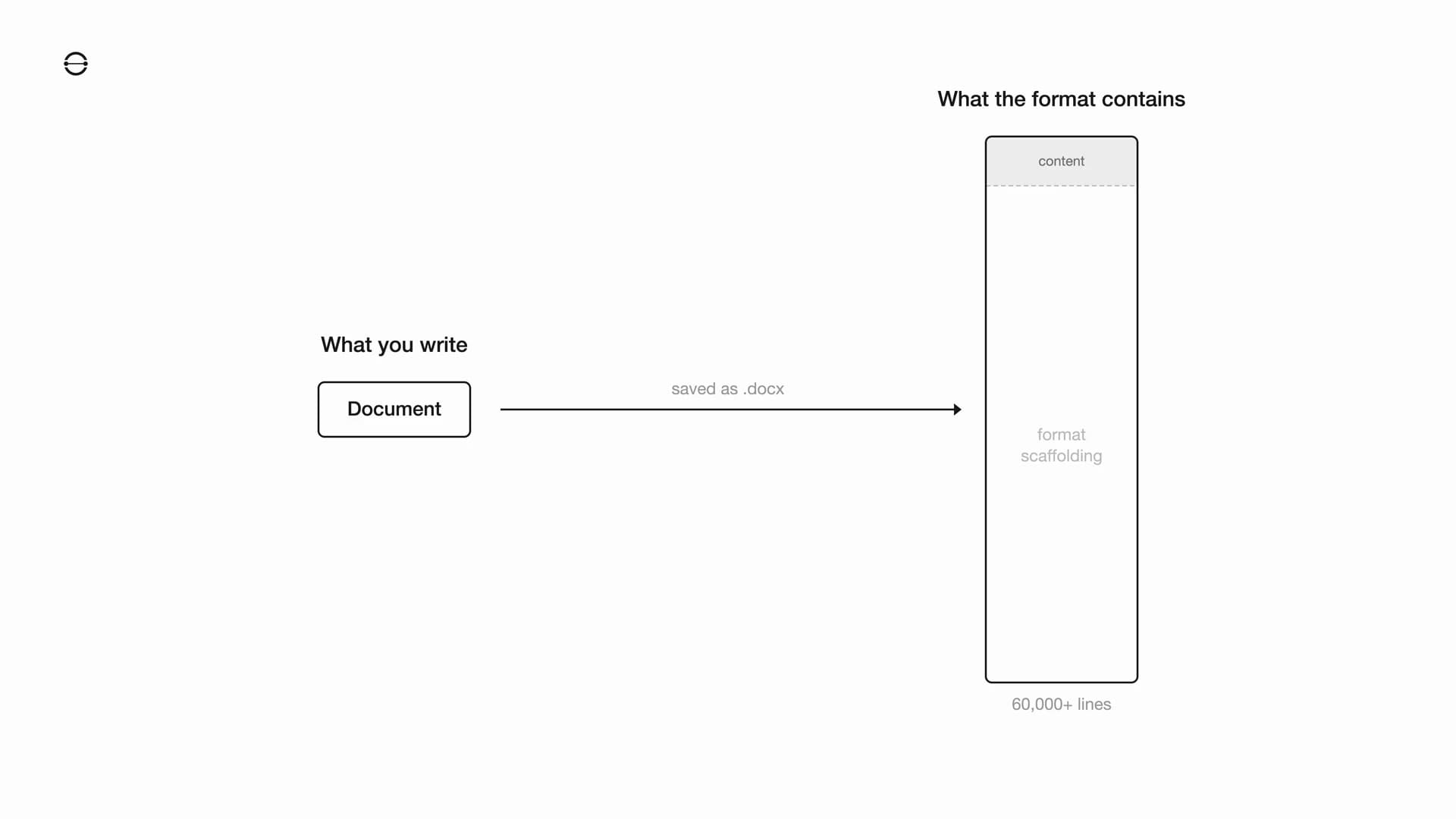
For a human in Word, most of this complexity is invisible. For an AI system, it's part of the job. Every extra layer of markup, indirection, and formatting state competes with the actual editing instruction. The more the model has to preserve, the less of its attention is spent on the user's intent.
Spreadsheets and slides add more indirection.
Excel adds another layer. Microsoft Learn documents SpreadsheetML's shared string table as a separate part inside the package. A workbook can store strings once in sharedStrings.xml, while cells reference those strings by index instead of repeating the text inline. That's efficient for storage, but it means the value a person sees in a cell isn't always sitting where an automated system first looks. (3)
Dates carry legacy baggage of their own. Microsoft still documents Excel's 1900 leap-year behavior, preserved for compatibility with Lotus 1-2-3. In practice that means dates are often serial numbers interpreted through a date system and formatting rules, not literal calendar strings. What looks obvious on screen may be represented very differently underneath. (4)
PowerPoint spreads meaning across even more parts. Microsoft Learn describes PresentationML as a structure of slides, slide masters, slide layouts, and theme elements. The theme system affects fonts, colors, backgrounds, fills, and effects, and positioning uses EMUs, with 914,400 EMUs per inch. The visible slide is the result of those layers being resolved together. (5)(6)(7)
| Word (.docx) | Excel (.xlsx) | PowerPoint (.pptx) | |
|---|---|---|---|
| Packaging | ZIP package with XML parts | ZIP package with XML parts | ZIP package with XML parts |
| Where content lives | Main body plus related parts | Worksheet XML plus shared-string or inline text handling | Per-slide XML plus master, layout, and theme parts |
| Typical indirection | Styles, themes, and relationship files | Shared-string indexes, serial dates, and styles | Slide masters, layouts, themes, and EMU positioning |
| What AI has to preserve | Text, layout, styles, and embedded objects | Values, formulas, types, formats, and sheet structure | Text, layout, theme-driven styling, and media placement |
Long context doesn't magically fix it.
It's tempting to argue that bigger context windows solve this. The evidence is weaker than that. Chroma's 2025 Context Rot report evaluated 18 models and found that performance degrades as input length grows, even on simple tasks. If long context already erodes reliability on controlled evaluations, burying document meaning inside large amounts of packaging and cross-references isn't a comforting setup. (8)
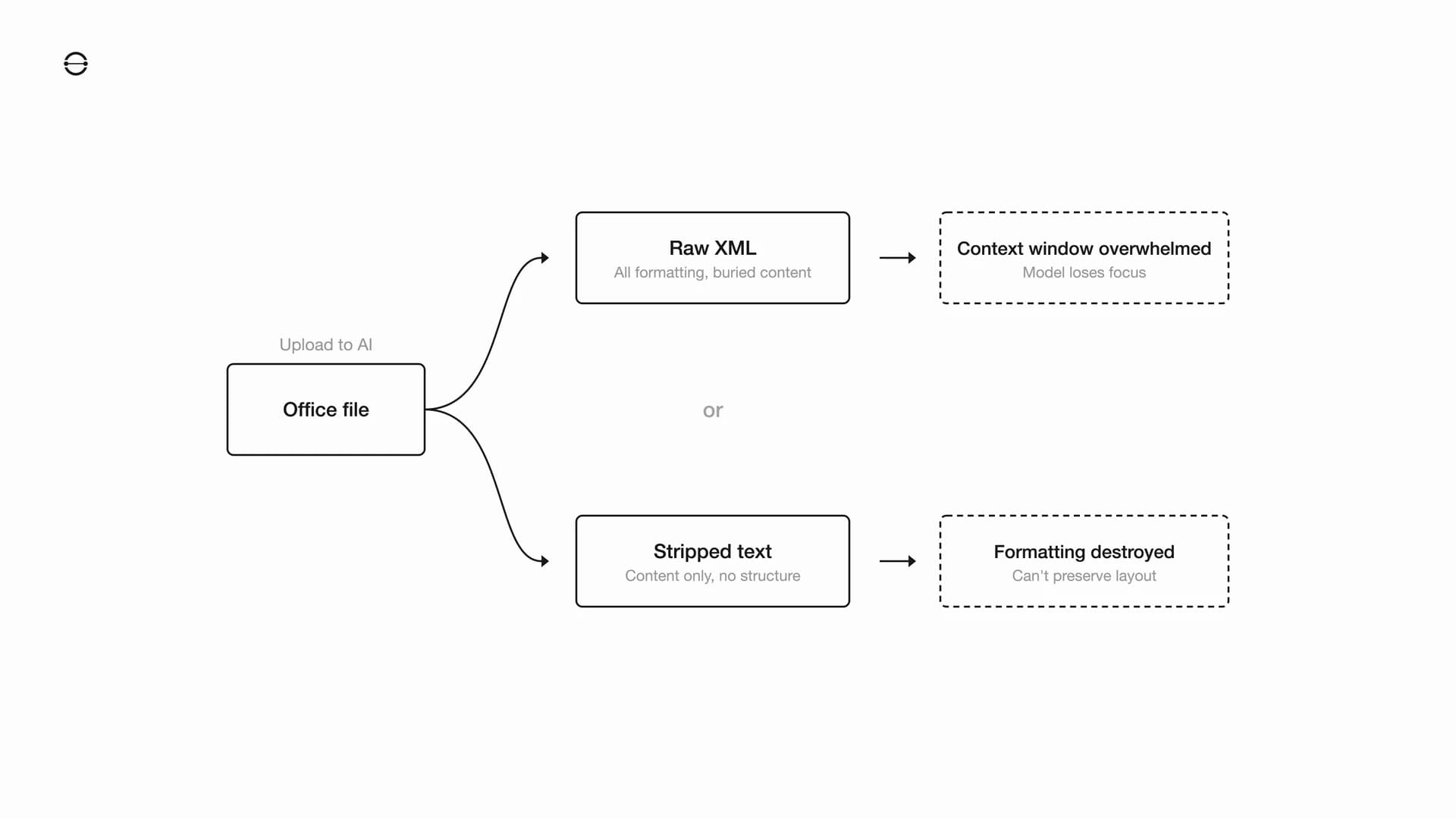
That doesn't mean every Office file is impossible for AI. Small and clean files can work fine. It means reliability falls faster than most demos imply once the model has to preserve content, structure, and layout at the same time. The harder the formatting problem, the more attention gets spent on representation overhead instead of the requested change.
Why chatbots route around the format.
OpenAI's own help documentation describes uploaded files as being processed through text extraction, code analysis, and image interpretation. For long text documents, only part of the content is stuffed into the context window and the rest is sent to retrieval. For spreadsheets, ChatGPT Enterprise always uses Code Interpreter. That's a practical architecture for question answering and analysis, but it's not the same as natively editing a complex Office file while preserving every formatting dependency. (9)
Microsoft's own MarkItDown project makes the same tradeoff from another angle. It converts Word, PowerPoint, Excel, PDF, and other files into Markdown for LLM and text-analysis pipelines. That's useful precisely because Markdown is easier for models to handle than native Office packaging. But conversion is a workaround, not a fidelity-preserving editing model. Once you flatten the document, you've already stepped away from the original representation. (10)
The recent counterexamples are instructive. Anthropic's Claude for Excel and Claude for PowerPoint aren't generic upload flows. They're Office add-ins. Anthropic says Claude for Excel preserves formulas and dependencies, cell relationships, and existing formatting and structure. It says Claude for PowerPoint can make pinpoint edits to specific slides and aims to preserve formatting and template compliance. (11)(12)
That's a real improvement. It's also not the same as solved. Anthropic still labels those products beta and recommends human review. Claude for Excel doesn't yet cover some advanced Excel capabilities such as macros, VBA, or data tables. Microsoft says Edit with Copilot in Excel works on the open workbook and doesn't yet support enterprise search or external tool integrations. Direct integration helps because the model is closer to the application's source of truth. But it still inherits decades of Office behavior, partial feature exposure, and vendor-controlled boundaries. Better than detached uploads isn't the same as AI-native. (11)(12)(13)(14)
Why this becomes an enterprise problem.
For an individual user, a bad AI round trip is annoying. For a company, it becomes operational risk. Contracts, board decks, pricing models, and financial workbooks are the documents where layout, formulas, theme consistency, and reviewability matter most. Those are also the cases where format drift is hardest to catch quickly.
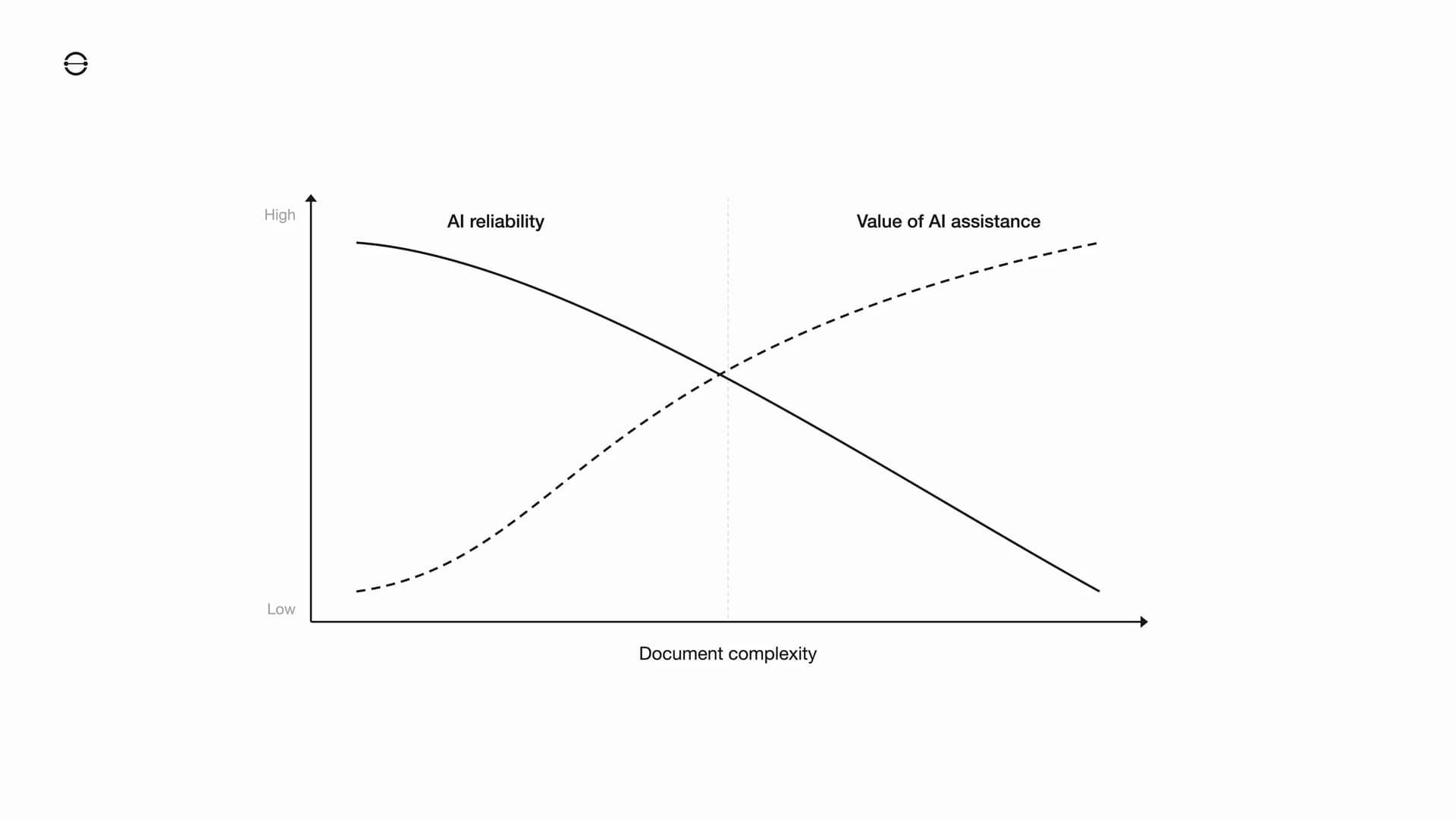
That's why the issue shows up as a reliability problem more than a pure intelligence problem. The model may understand the instruction perfectly well. The failure happens in the gap between understanding the request and preserving the file's hidden dependencies on the way back out.
The inversion is the real problem. Simple files that barely need automation tend to survive more often. Complex files where AI would create the most value are the ones where structural fidelity matters most and hidden breakage becomes expensive.
The format is part of the product.
The usual response is to ask for better parsers, better code generation, or bigger models. Those will help at the margins. But they leave the core structure intact. If the working representation is still a package of XML parts, relationship files, theme references, serial numbers, and reconstruction logic, the model is still spending capacity on the wrapper instead of the work.
That's why we keep coming back to the format itself. When the data model is built for direct, targeted edits, the AI doesn't need to reconstruct an office document through layers of packaging just to change one heading or update one cell. It works on the same underlying representation the product uses. We wrote more about that in Why We're Building a New File Format. The short version is simple. The format sets the ceiling. Everything built on top of it inherits the same constraints, including AI.
The bottleneck isn't that models can't understand documents. It's that legacy office formats ask them to reason through decades of compatibility baggage before they can make a clean edit. Models will keep improving. If the underlying format stays hostile to direct machine editing, the ceiling stays lower than it needs to be.
References
- Use Office Open XML (OOXML) in Word add-ins for rich content insertion Microsoft Learn, accessed April 7, 2026.
- The artificial complexity of OOXML files (the DOCX case) The Document Foundation, October 3, 2025.
- Working with the shared string table Microsoft Learn, accessed April 7, 2026.
- Excel incorrectly assumes that the year 1900 is a leap year Microsoft Learn, last updated March 30, 2026.
- Structure of a PresentationML document Microsoft Learn, accessed April 7, 2026.
- How to: Apply a theme to a presentation Microsoft Learn, accessed April 7, 2026.
- VML Units Microsoft Learn, accessed April 7, 2026.
- Context Rot: How Increasing Input Tokens Impacts LLM Performance Chroma, July 14, 2025.
- Optimizing File Uploads in ChatGPT Enterprise OpenAI Help Center, accessed April 7, 2026.
- MarkItDown Microsoft GitHub repository, accessed April 7, 2026.
- Use Claude for Excel Claude Help Center, accessed April 7, 2026.
- Use Claude for PowerPoint Claude Help Center, accessed April 7, 2026.
- Edit with Copilot in Excel Microsoft Support, accessed April 7, 2026.
- Choose your model when editing with Copilot in Excel Microsoft Support, accessed April 7, 2026.